Spiro
Initial Solo Project - MICA UX Design M.P.S
Scope: 8 weeks
Role: UX Designer, UX Researcher, and Project Manager
Tools: Figma, Google Docs, Google Sheets, Google Slides
Task:
Create a mobile app in the health & wellness space
Idea:
Introduce the Spiraldex and Chronodex system as an app for users to log their days hour by hour to utilize it as a journal and/or for time management to decrease mental clutter.


What is Spiro?

Spiro is a time-log journal app inspired by the Spiraldex and Chronodex systems. Users, who have a hard time writing in a journal but still wants to track what they do each day, can log and map out their day hour by hour. The user can additionally look back at their log of previous clocks, track their mood, and view their habits.
Product Vision
To encourage productivity and self awareness--the goal is for users to visualize their day and feel accomplished with their completed clocks. Users will be able to keep a detailed log of their day down to the minutes and look back at old clocks to reflect.
Business Rationale
The app will be for users that view journaling as keeping a log of what they did each day rather than for personal thoughts and feelings. Users will be able to view their day logged by the minute and look back on previously logged days to reflect.
Additionally, a digital spiraldex/chronodex app does not exist on the Apple app store currently. This app can be used as a time management/planning app as well.
Competitive Analysis

Personas
Ryan, 28

Demographics
-
Male
-
9-5 office worker, 4 years of experience
-
Works in Finance
Behaviors
-
Always working -- little work/life balance
-
Tries to go on a run everyday
-
Enjoys playing video games during his freetime
Needs/Goals
-
Log tasks and events for his morning before work, office work, any after work to-dos, and leisure time
-
Wants to be mindful of where he allocates time each day
Mary, 40

Demographics
-
Female
-
Stay at home mom, married with 2 kids -- 9 year old and 13 year old
-
Has an Etsy store
Behaviors
-
Loves knitting
-
Primary caretaker of the home
-
Avid Yogi
Needs/Goals
-
Distinguish between tasks for her life and tasks for her family’s life
-
Wants to keep a daily log of everything done so she can look back at it one day
Ryan's User Story & Flow
User Story:
As a User, I want to quickly log my day with short cuts so I can save time

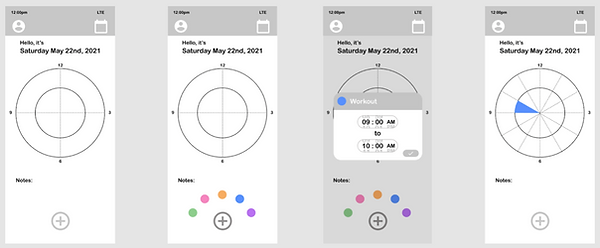
initial wireframe

Mary's User Story & Flow
User Story:
As a User, I want to complete my clocks at the end of the day so I feel accomplished

initial wireframe

Design / Creative Ideation
Design Principles
Simple
The goal is for first time users is for them to be able to quickly understand the app and the spiraldex clock. The goal moving forward is to ensure that the user never feels overwhelmed from the design of the app.
Efficient
We don’t want the user to be spending all day trying to figure out the app -- for this purpose, users will have the ability to quickly utilize and navigate the app. A clear design with minimal choices will allow the user to get back to their day as quick as possible.
Calming
This app should always act as a safe space for the user. Whether it is just for logging their days or helping them ease their mental clutter, the user will always know that the app exists for them to ease their lives.
Encouraging
We want the user to feel empowered through each clock they complete -- to be able to look back at their day or past days and remind themselves of what they accomplished and how much they’ve grown.
Design System




Next Steps
Prototype screens for dark mode
Design/Prototype additional user research findings:
-
Functionality for calendar view: zoom feature
-
Share feature & layout for the shareable image
-
A legend layout/design
Create a pattern/overlay design to use instead of colors or with the colors. This will be ideal for users who have trouble distinguishing color since the current color palettes may not be ideal or just for people who don’t want to deal with colors.
Get user feedback on revised mid fidelity wires and/or prototype